Webhooks
A webhook endpoint is an HTTPS URL on your server. When something happens to an email, SendHawk.Online sends it a signed POST with the event as JSON. Webhooks are how you keep your own records in step without polling.
Add an endpoint
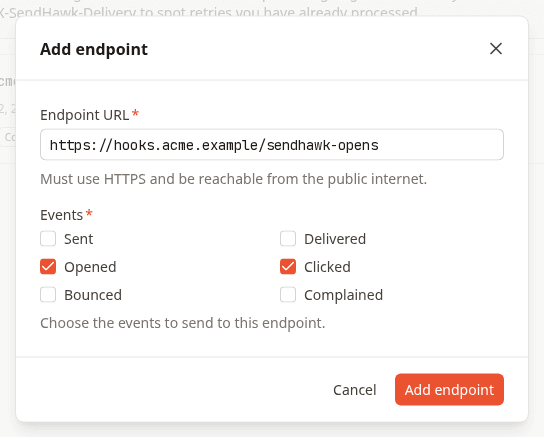
Owners and admins add endpoints in Settings > Webhooks: the URL, which must start with https://, and the events to receive.
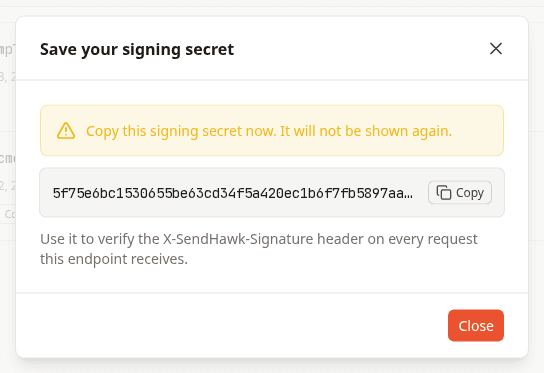
The endpoint's signing secret is shown once, when you create it. Store it next to your other secrets; you need it to verify signatures.
The Webhooks guide walks through the settings page, test events and the delivery log.
Events
| Event | Sent when | Source |
|---|---|---|
sent | Amazon SES accepted the message for delivery. | SendHawk.Online, right after Send email succeeds |
delivered | The recipient's mail server accepted the message. | Amazon SES |
bounced | The message bounced, permanently or after Amazon SES stopped retrying. | Amazon SES |
complained | The recipient marked the message as spam. | Amazon SES, through the mailbox provider's feedback loop |
opened | The recipient opened the email, counted once per email. | Open tracking |
clicked | The recipient clicked a link, counted once per link per email. | Click tracking |
An endpoint subscribes to any of these six. The other email statuses, queued and failed, never produce a webhook event, so they are not offered.
Send test event in Settings > Webhooks delivers one event of type test to that endpoint, with data set to { "test": true }, so you can check your handler and signature code before real mail flows.
Payload
Every event has the same envelope:
{
  "id": "0193a6c1-8f2e-7d40-b5a1-3c9e0d7f4a21",
  "type": "delivered",
  "createdAt": "2026-11-03T09:15:04.120Z",
  "data": {
    "messageId": "4f1c2b8e-7a3d-4e5f-9b21-0c6d8e9f1a2b",
    "to": "ada@example.com",
    "providerMessageId": "010701932f6b8c1e-5a7d9c3e-4b2f-4e8a-9d1c-7f6e5d4c3b2a-000000",
    "timestamp": "2026-11-03T09:15:04.120Z",
    "processingTimeMillis": 1639,
    "recipients": ["ada@example.com"],
    "smtpResponse": "250 2.0.0 OK",
    "reportingMTA": "a8-27.smtp-out.amazonses.com",
    "remoteMtaIp": "203.0.113.25"
  }
}
X-SendHawk-Event header.The rest of data depends on the event. For events from Amazon SES it is the object SES published, passed through as SES sent it; fields SES leaves out are absent.
| Event | Fields in data |
|---|---|
delivered | timestamp, processingTimeMillis, recipients, smtpResponse, reportingMTA, remoteMtaIp |
bounced | bounceType (Permanent, Transient or Undetermined), bounceSubType, bouncedRecipients (each with emailAddress, and action, status and diagnosticCode when the bounce carried them), timestamp, feedbackId, reportingMTA |
complained | complainedRecipients (each with emailAddress), timestamp, feedbackId, complaintSubType, userAgent, complaintFeedbackType, arrivalDate |
opened | userAgent |
clicked | url, userAgent |
Amazon SES describes its fields in the contents of SES event data.
Headers
| Header | Value |
|---|---|
Content-Type | application/json |
X-SendHawk-Event | The event type, for example bounced. |
X-SendHawk-Delivery | The delivery's id. It stays the same on every retry of the same event, so you can log and correlate attempts. |
X-SendHawk-Timestamp | When this delivery attempt was signed, in Unix seconds. |
X-SendHawk-Signature | sha256= followed by the hex HMAC-SHA256 signature. |
Verify signatures
Anyone can POST to a public URL, so check the signature before you trust an event. SendHawk.Online signs the string <timestamp>.<raw request body> with HMAC-SHA256, keyed with your endpoint's signing secret, and sends the hex digest as X-SendHawk-Signature: sha256=<hex>.
To verify a request:
- Read the raw request body as bytes, before any JSON parsing. Re-serialized JSON does not match byte for byte.
- Reject the request if
X-SendHawk-Timestampis more than 5 minutes from your clock. That stops an attacker from replaying a captured request later. - Compute HMAC-SHA256 of
<timestamp>.<raw body>, keyed with the signing secret exactly as shown when you created the endpoint (the 64-character string itself, as UTF-8 - do not hex-decode it). - Compare your digest with the one after
sha256=in constant time, never with==.
import crypto from 'node:crypto'
import express from 'express'

const secret = process.env.SENDHAWK_WEBHOOK_SECRET
const TOLERANCE_SECONDS = 5 * 60

function isValidSignature(rawBody, timestamp, signature) {
  if (!/^\d+$/.test(timestamp ?? '') || !signature?.startsWith('sha256=')) return false
  if (Math.abs(Date.now() / 1000 - Number(timestamp)) > TOLERANCE_SECONDS) return false

  const expected = crypto
    .createHmac('sha256', secret)
    .update(`${timestamp}.`)
    .update(rawBody)
    .digest()
  const received = Buffer.from(signature.slice('sha256='.length), 'hex')

  return received.length === expected.length && crypto.timingSafeEqual(received, expected)
}

const app = express()

// express.raw keeps the body as a Buffer, exactly as it was signed.
app.post('/webhooks/sendhawk', express.raw({ type: 'application/json' }), (req, res) => {
  const valid = isValidSignature(
    req.body,
    req.get('X-SendHawk-Timestamp'),
    req.get('X-SendHawk-Signature')
  )
  if (!valid) return res.sendStatus(400)

  const event = JSON.parse(req.body.toString('utf8'))
  // Acknowledge first, then process: queue the event and skip ids you have seen.
  res.sendStatus(200)
  console.log(event.type, event.data.messageId)
})

app.listen(3000)
import hashlib
import hmac
import os
import time

from flask import Flask, abort, request

SECRET = os.environ["SENDHAWK_WEBHOOK_SECRET"].encode()
TOLERANCE_SECONDS = 5 * 60

app = Flask(__name__)


def is_valid_signature(raw_body: bytes, timestamp: str, signature: str) -> bool:
    if not timestamp.isdigit() or not signature.startswith("sha256="):
        return False
    if abs(time.time() - int(timestamp)) > TOLERANCE_SECONDS:
        return False

    signed = timestamp.encode() + b"." + raw_body
    expected = hmac.new(SECRET, signed, hashlib.sha256).hexdigest()
    return hmac.compare_digest(expected, signature[len("sha256="):])


@app.post("/webhooks/sendhawk")
def sendhawk_webhook():
    raw_body = request.get_data()  # the bytes as they were signed
    if not is_valid_signature(
        raw_body,
        request.headers.get("X-SendHawk-Timestamp", ""),
        request.headers.get("X-SendHawk-Signature", ""),
    ):
        abort(400)

    event = request.get_json()
    # Acknowledge quickly; queue the event and skip ids you have seen.
    print(event["type"], event["data"]["messageId"])
    return "", 200
Respond quickly
Answer with any 2xx status within 5 seconds. Anything else counts as a failed attempt: another status (redirects included - they are never followed), a timeout, a TLS error or a refused connection. Do the real work after responding, from a queue, so a slow database never turns into a retry.
Retries
A failed delivery is retried with exponential backoff, up to 10 attempts in total:
| Attempt | When |
|---|---|
| 1 | Within about a minute of the event |
| 2 | 2 minutes after attempt 1 failed |
| 3 | 4 minutes after attempt 2 |
| 4 | 8 minutes after attempt 3 |
| 5 | 16 minutes after attempt 4 |
| 6 | 32 minutes after attempt 5 |
| 7 | 64 minutes after attempt 6 |
| 8 | 128 minutes after attempt 7 |
| 9 | 256 minutes after attempt 8 |
| 10 | 6 hours after attempt 9 |
Deliveries go out on a one-minute schedule, so each wait can run up to a minute longer. After the tenth failure the event is dropped, about 14 and a half hours after it happened.
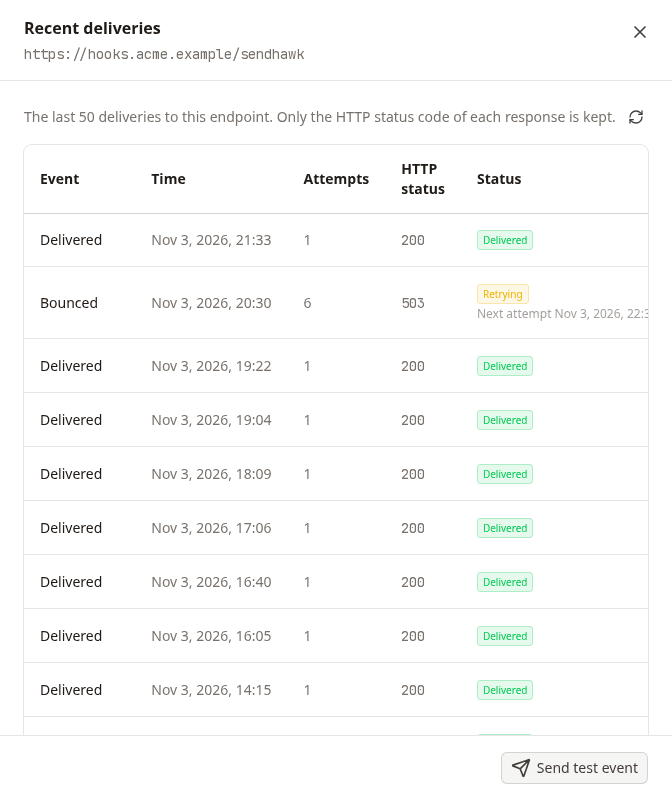
Deliveries on an endpoint in Settings > Webhooks shows the last 50 deliveries with their attempts, the HTTP status your server answered and when the next attempt is due:
Because of retries, design your handler for three things:
- Duplicates. An attempt can reach you, time out on the way back and be sent again. Deduplicate on
id. - Order. A retried event can arrive after a newer one. Use
createdAt, not arrival order, when it matters. - Gaps. An event dropped after ten failures is not sent again. Retrieve email has the full history of any email.